Ghostly Chatter: Because the Web Was Always Meant to Be Shared
Posted on yourdev.net
Remember when browsing the internet felt like walking through a ghost town? You'd land on a Wikipedia article, a Reddit thread, or a news story knowing that thousands of other people were reading the exact same page at the same moment — and yet you were completely invisible to each other. No wave, no nod, no "hey, are you seeing this too?" Just you, alone, staring at a screen.
Ghostly Chatter is my attempt to fix that.
It's a Firefox browser extension that layers a lightweight social presence on top of every page you visit. When two or more people are browsing the same URL at the same time, they become visible to each other. Not in a creepy "someone is watching you" kind of way — more like the feeling of sitting in a library where you can see the other readers. You're still doing your own thing, but you're not alone anymore.
Ghost Avatars: You Can See Me, I Can See You
The centrepiece of the extension is the Ghost Avatars system. Every user gets a personal avatar the moment they install the extension — a little robot or creature generated uniquely for you from the DiceBear Avatars API. You can customise it, upload your own image, or just roll with whatever you're given. Pair it with a display name and that's you on the Ghostly Chatter network.
When you and another user land on the same URL, each of you sees a small floating avatar tracking the other's real mouse position across the page. There's something unexpectedly delightful about watching another cursor explore the same article you're reading — hovering over a paragraph you just finished, pausing on an image, scrolling in the same direction.
The cursor movement isn't snappy or robotic. I put real effort into making it feel human using spring physics — the avatar lags slightly behind the actual cursor and overshoots a little on direction changes, mimicking the natural inertia of a real hand. When someone stops moving, their avatar gently bobs in an idle animation, like it's breathing. It sounds like a small detail but it transforms the experience from "data visualisation" to "there's a real person over there."
Hovering over someone's avatar tells you their username and how long they've been on the page. When they're typing a message, a small "typing..." indicator appears below their avatar, just like in any modern messaging app.
Ephemeral Chat: Say It, Then It's Gone
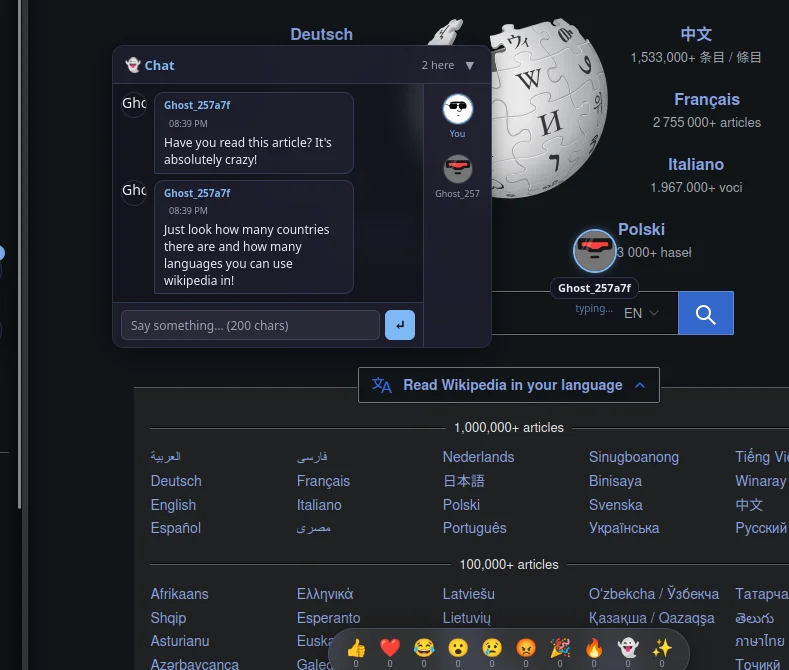
Below every page there's a collapsible chat panel anchored to the bottom-right corner. You can drag it wherever you want, resize it, or collapse it entirely — it never gets in the way unless you want it.
The chat is ephemeral by design. Messages are relayed to everyone currently on the same page and disappear when the session ends. There's no log, no history, no archive. This isn't a bug — it's a deliberate choice that changes the nature of conversation. Because nothing is permanent, people say things they might not bother typing into a comment thread. Quick reactions. Shared laughs. "Wait, did you just see that?" moments.
The panel shows a live count of who's currently on the page alongside you. Arriving to find "5 people here" on a news article hits differently than reading it alone.
A few small touches make the chat feel alive: typing indicators show up below avatars and in the panel header, join/leave notices are soft and unobtrusive, and a sidebar lists the usernames of everyone currently present. Slash commands add personality — /shrug appends ¯\_(ツ)_/¯ to your message, /me lets you send an action in the third person, and /clear wipes your own view.
Messages max out at 200 characters. Short messages breed better conversations.
Reaction Bar & Floating Balloons: Pure Joy
Fixed to the bottom-centre of every page (above the page content, never covering it) is a small semi-transparent strip of emoji buttons:
👍 ❤️ 😂 😮 😢 😡 🎉 🔥 👻 ✨
Clicking one does two things at once: it spawns an emoji balloon on your own screen that floats upward over three seconds with a gentle sinusoidal horizontal drift — like an actual balloon — and it broadcasts that same reaction to everyone else on the page so they see their own balloon appear too.
It's completely silly and completely effective. Nothing communicates "I'm having a good time on this page" quite like a 🔥 emoji lazily drifting up the screen. During a heated comment section you'll watch 😡 balloons and ❤️ balloons float past each other in opposite directions. It's chaotic and weirdly expressive.
Each emoji button shows a live counter of how many times that reaction has been used on the current page during the session, giving you a real-time pulse of how the room is feeling.
Page Comments: Leave Your Mark
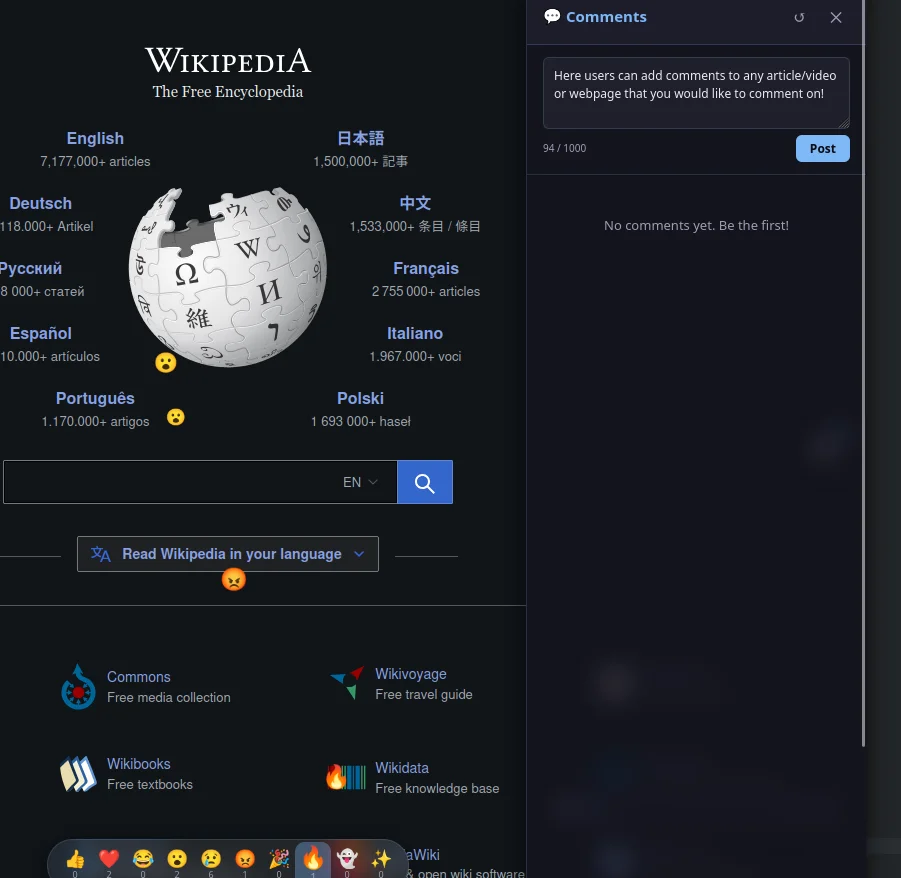
The ephemeral chat is great for the moment, but sometimes you want to leave something more permanent. The Page Comments side-drawer (triggered by a floating button on the right edge of the page) lets you attach plain-text comments to any URL that persist in the database.
Comments support upvotes and downvotes, one level of reply threading, editing within five minutes of posting, and deletion by the author. It's a simple, clean discussion system that lives on the page itself rather than in a separate forum or social platform.
The toolbar badge on the extension icon shows you at a glance how many comments exist for whatever page you're currently on — a small but useful nudge to open the drawer on pages where conversations are already happening.
Hottest Sites: Find Where the Action Is
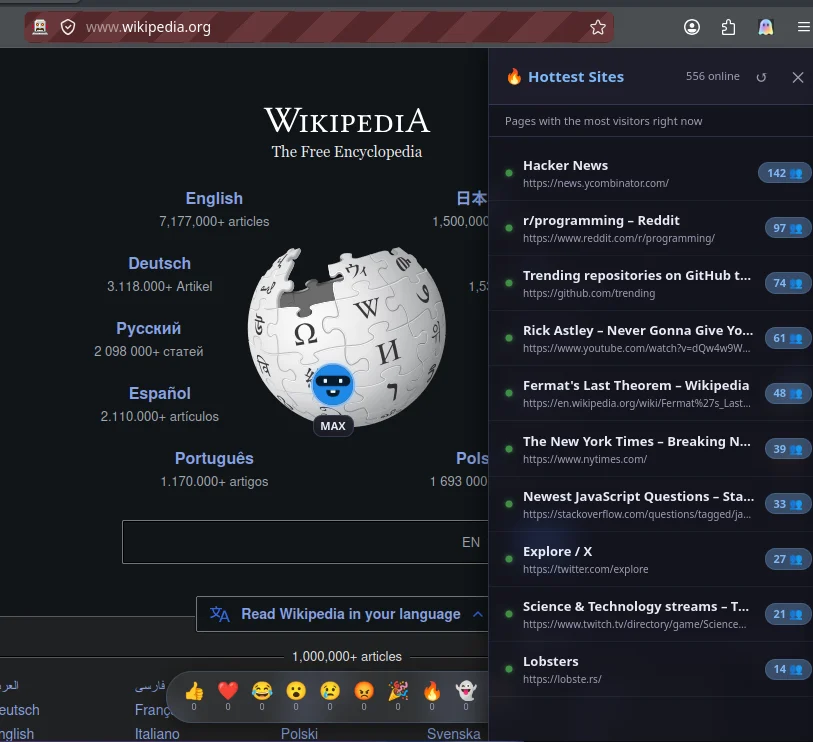
One of my favourite features is the 🔥 Hottest Sites panel. It's a live-updating list of every page on the Ghostly Chatter network that currently has active users, sorted by how many people are there right now.
Open it up and you might discover that seventeen people are simultaneously browsing the same Wikipedia article about Byzantine architecture, or that four people are on the same obscure forum thread at 2 AM. Click any entry and it opens in a new tab. It's a social discovery layer for the web — not algorithmic, not curated, just real people, right now, over there.
How It Works (The Short Version)
Everything runs in real time over a WebSocket connection managed by the extension's background script. A single connection is shared across all your open tabs so the overhead is minimal.
Pages are identified by a normalised, hashed version of the URL — query parameters, fragments, and tracking junk like utm_source are stripped before hashing so two people on the same article see each other even if they arrived from different links.
Cursor positions are broadcast as normalised viewport-relative coordinates (0–1 range) so they work correctly across different screen sizes, zoom levels, and window widths. All the animation happens client-side at 60 fps using requestAnimationFrame and CSS transforms — no layout-triggering properties, no jank.
The injected UI is deliberately isolated from the host page using strict CSS scoping. No resets, no style pollution, no breaking the page you're visiting.
The Philosophy
I built Ghostly Chatter because I think the "everyone browses alone" model of the modern web is an accident of architecture, not a deliberate choice. The protocols were never designed to show you other readers. Nobody decided you should be invisible — it just turned out that way.
The extension is non-intrusive by default. All panels are collapsed. The reaction bar is small and semi-transparent. The avatars float but don't obstruct. You can disable any feature individually or turn the whole thing off with one toggle. The goal is to make the web feel inhabited without turning every page into a chat room.
If the server is unreachable, the extension silently degrades — you keep browsing normally, you just don't see other people. It's social when it can be, invisible when it can't.
Try It
Ghostly Chatter is a Firefox extension. You can find the source code and build instructions in the repository. I run a development server locally for testing, and I'm working on a public deployment for anyone who wants to use it.
If you end up on the same page as me — you'll see my avatar. Say hi.
Built with vanilla JS, no frameworks, no build step required. Backend: Node.js + WebSocket + SQLite. Extension: Firefox MV2, Chrome MV2/MV3 compatible via polyfill.
Available for download and/or install from
https://addons.mozilla.org/en-US/firefox/addon/ghostly-chatter
yourdev.net
Need an Android Developer or a full-stack website developer?
I specialize in Kotlin, Jetpack Compose, and Material Design 3. For websites, I use modern web technologies to create responsive and user-friendly experiences. Check out my portfolio or get in touch to discuss your project.
Comments (0)
Be the first to comment!