A transparent, minimal PGP extension built for Firefox and Tor Browser users who need to handle encrypted messages every day — without installing separate programs or sending keys to mystery websites. Your keys and messages stay inside your browser, protected by a master password.
Correctly taught not to install random Tor extensions? This one is designed to be transparent, minimal, and verifiable — with no hidden tricks or packed code.
No more GPG command lines, no more outdated GPG4USB. Everything you need — key generation, encryption, decryption, signing and verification — in a clean sidebar UI.
Keep your PGP keys on a USB stick alongside your Tor Browser profile. Perfect for a live USB privacy setup or carrying keys between machines.
Complete PGP functionality built directly into your browser sidebar
A look at the extension in action
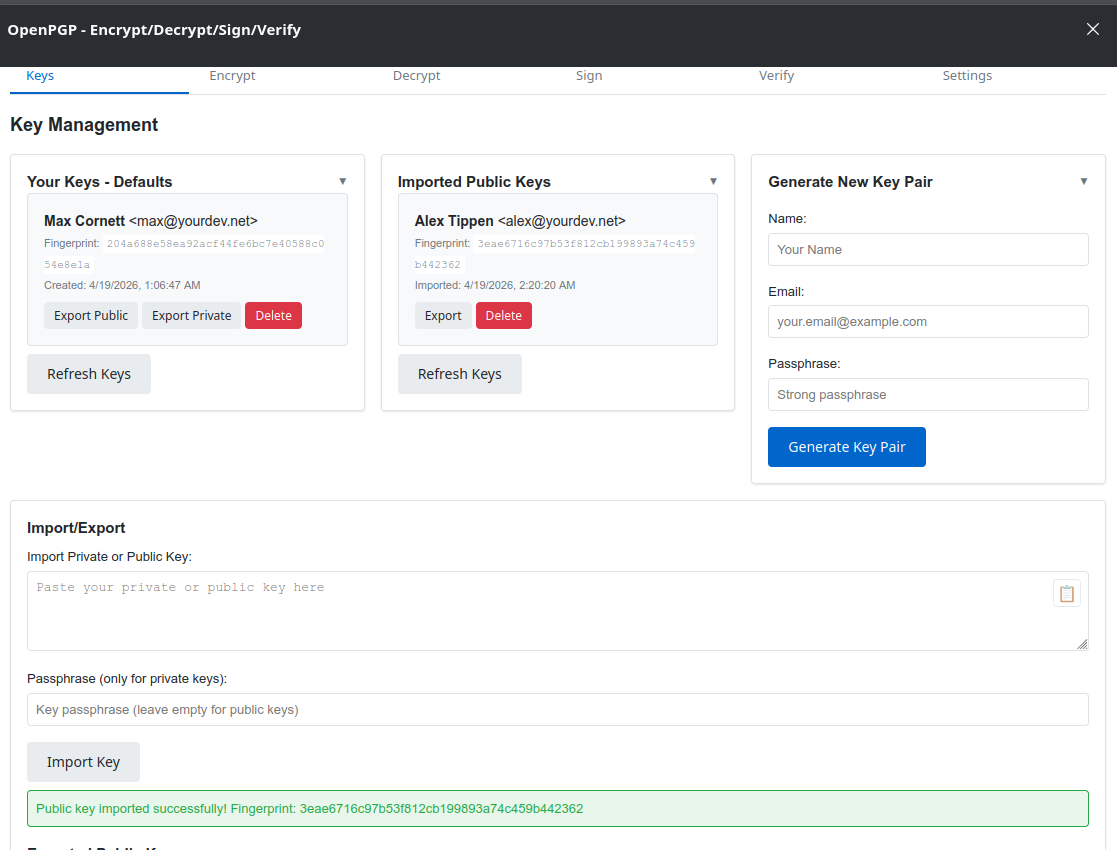
Generate new RSA key pairs, import existing keys, and export them for backup — all from a single panel.
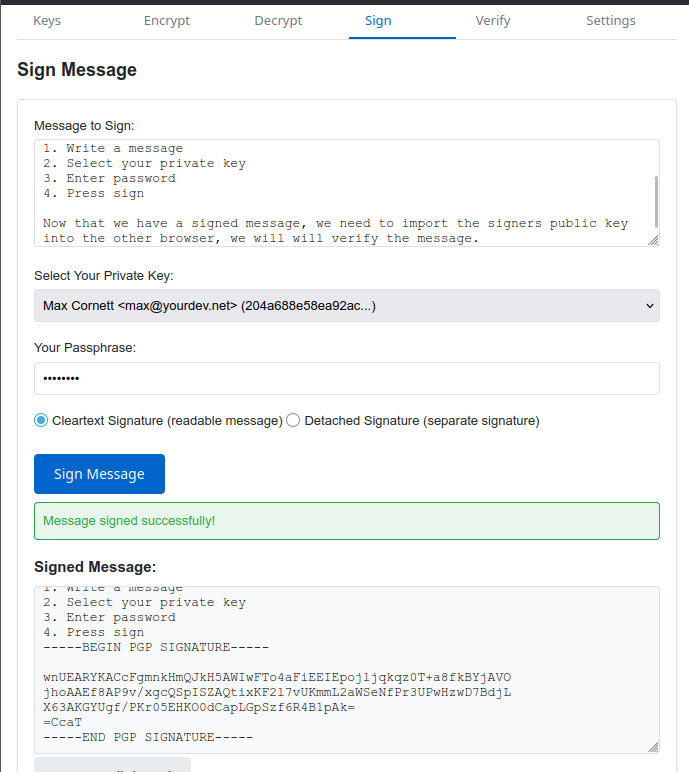
Write a message and sign it with your own private key to prove it came from you.
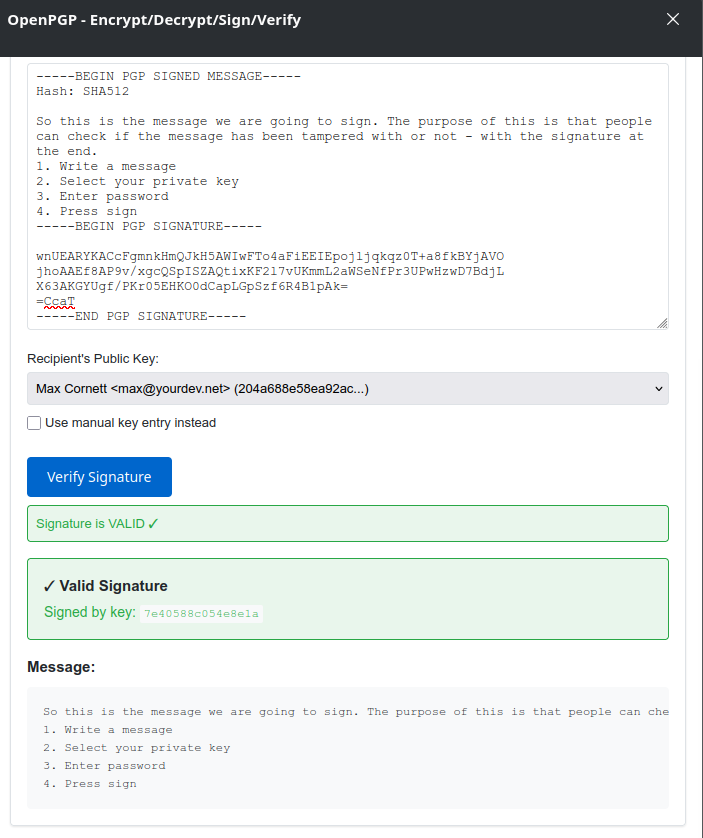
Paste a signed message and the sender's public key to instantly verify authenticity.
Watch the extension in action — from setup to advanced use
How to set up your master password to protect all stored keys, then generate your first RSA key pair from inside the extension.
How to import someone's public key into the extension and use it to encrypt a private message intended only for them.
Step-by-step walkthrough of signing a message with your private key so recipients can verify it really came from you.
Full end-to-end demo of signing a message with your key pair and then verifying it using the sender's public key.
Everything you need to get started in minutes
Open the sidebar by clicking the OpenPGP icon in the toolbar, or go to View → Sidebar → OpenPGP.
Navigate to the Keys tab.
Fill in your name, email address, and a strong passphrase.
Click "Generate Key Pair". Generation takes around 30–60 seconds depending on key size.
Your new key pair is saved in the browser. Export a backup copy from the Keys tab.
Go to the Keys tab and scroll down to the Import / Export section.
Paste the key block (private or public) into the text area — the extension detects the type automatically.
For a private key, enter the passphrase. For a public key, leave the field empty.
Click "Import Key". Public keys appear in the Imported Public Keys section.
Go to the Encrypt tab.
Select the recipient from the "Recipient's Public Key" dropdown (requires an imported public key), or check "Use manual key entry" to paste a key directly.
Type your message. Optionally check "Sign message with my key" to prove authorship.
Click "Encrypt Message" and copy the PGP block.
Go to the Decrypt tab.
Paste the encrypted PGP message into the text area.
Select your private key and enter your passphrase.
Optionally select the sender's public key from the dropdown to verify their signature at the same time.
Click "Decrypt Message".
Go to the Sign tab.
Type the message you want to sign.
Select your private key and enter the passphrase.
Choose signature type: Cleartext (message visible) or Detached (separate signature block).
Click "Sign Message" and copy the result.
Go to the Verify tab.
Paste the signed message (including the PGP signature block).
Paste the signer's public key.
Click "Verify Signature". The result confirms whether the signature is valid and untampered.
Designed for transparency and auditability
Keys are stored in Firefox's browser.storage.local — isolated to the extension, never synced or sent. Structure:
MiniPGP_keys — your own private/public key pairsMiniPGP_public_keys — imported recipient public keysThe extension requests only what it needs:
storage — to save your keys locallydownloads — to export key filesManifest V3 compliant
Powered by OpenPGP.js — the most widely reviewed open-source PGP library for JavaScript. Compatible with the PGP/GnuPG standard (RFC 4880).
OpenPGP.js WebsiteGet up and running in a few steps
about:debuggingmanifest.jsonTemporary installations are removed when Firefox restarts.
.xpi package or build it: zip -r OpenPGP.xpi *about:addonsOpenPGP.xpi file and confirmFor production, sign the extension through Mozilla's Add-on store.
# Install OpenPGP.js
npm install openpgp
# Build the extension archive
# (increments version number automatically)
./make.sh
make.sh reads __version__, increments it, and packages the archive.
What we protect and what you should know
OpenPGP is part of a portfolio of open-source tools built by Max Cornett @ YourDev.net