PGPSuite for Firefox & Tor Browser

PGPSuite brings OpenPGP encryption directly into Firefox and Tor Browser, making it easy to encrypt, decrypt, sign, and verify messages without installing separate desktop software.
Whether you're communicating on privacy-focused forums, marketplaces, email services, or simply exchanging encrypted messages with friends, PGPSuite keeps everything inside your browser.
Install
Install directly from Mozilla Add-ons:
Install PGP-Suite for Firefox or TOR Browser
- Visit the link above.
- Click Add to Firefox.
- Confirm the installation.
- The PGPSuite icon will appear in your browser toolbar.
That's it. No additional software, command-line tools, or configuration is required.
NOTICE for TOR users!
Because of how tor is built around security and privacy, for this to work under tor you will have to select "Allow extension to run in private windows".
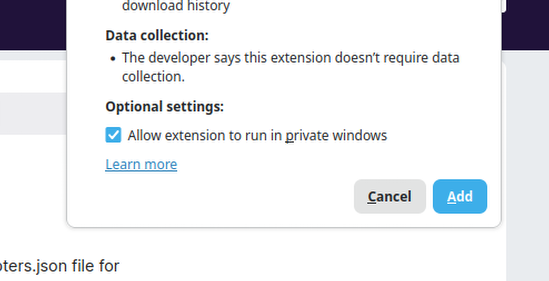
This is because ALL windows when using TOR Browser are considered private windows becuase of how their security layers are built, set up and configured for your safety. This does not however change the fact that the extension does not have access to data in any windows, and only uses permissions which allows to access downloads (for exporting data - download an exported version of all of your keys etc to import in another browser with the extension) and it has access to storage - which is used to save all of the keys, public and private to your local browser storage. The extension never has any access to anything (including no data inside of any tabs - any website you visit) or anything else.
Why Use PGPSuite?
Many people use PGP for:
- Secure messaging
- Privacy-focused communities
- Encrypted login credentials
- Secure document sharing
- Digital signatures
Traditionally, this requires installing separate applications and learning command-line tools.
PGPSuite simplifies the process by providing a complete OpenPGP toolkit directly inside your browser.
Security First
PGPSuite was designed with privacy and transparency in mind.
Your Data Stays Local
- Encryption and decryption happen inside your browser.
- Your keys are never uploaded to external servers.
- Messages are processed locally on your device.
Minimal Permissions
The extension only requests permissions required for its functionality.
Open Source
The source code is publicly available and can be inspected by anyone.
Built on OpenPGP.js
PGPSuite uses OpenPGP.js, one of the most widely used OpenPGP implementations in the JavaScript ecosystem.
Features
Key Management
- Generate new OpenPGP key pairs
- Import existing private keys
- Import public keys from contacts
- Export private and public keys
- Manage multiple keys
Message Encryption
- Encrypt messages using public keys
- Decrypt messages using your private keys
- Encrypt and sign messages simultaneously
Digital Signatures
- Sign messages
- Verify signatures
- Detect tampered or modified content
Browser Integration
- Sidebar interface
- Copy-to-clipboard functionality
- Automatic detection of PGP content on web pages
- Context menu integration
Getting Started
Create Your First Key Pair
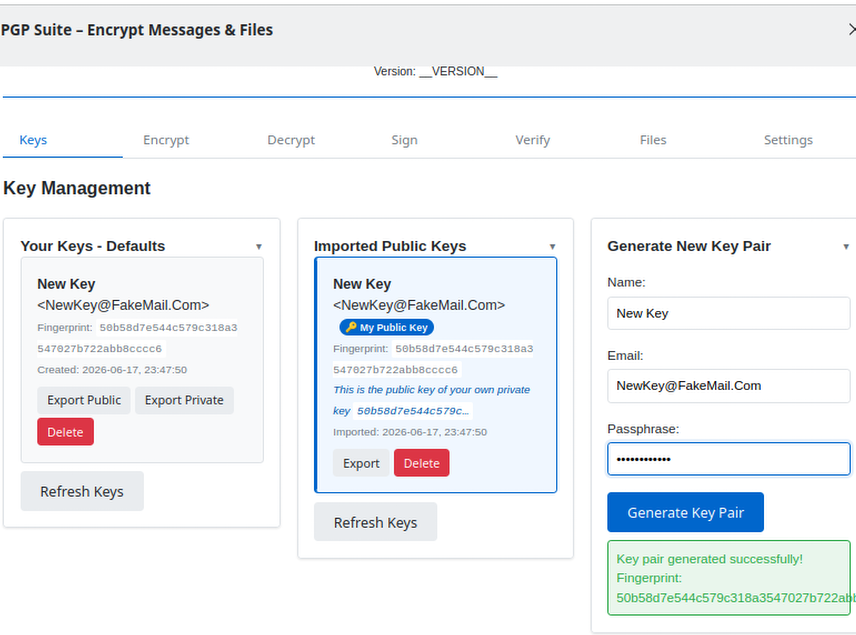
Open PGPSuite from the toolbar.
Navigate to the Keys tab.
Enter:
- Name
- Email address
- Strong passphrase
Click Generate Key Pair.
Key generation may take a short time depending on your device.
Import Existing Keys
If you already have PGP keys:
- Open the Keys tab.
- Select Import Key.
- Paste your key.
- Enter the passphrase if required.
- Click Import.
PGPSuite automatically detects whether the key is public or private.
Encrypting a Message
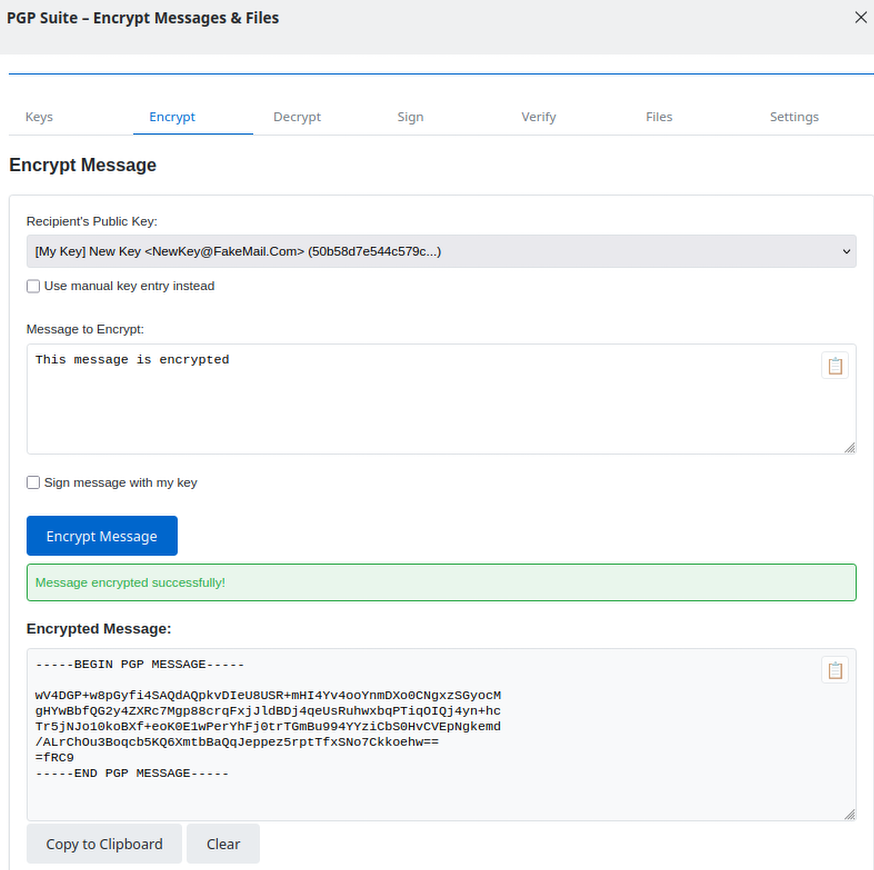
- Open the Encrypt tab.
- Select the recipient's public key.
- Enter your message.
- Click Encrypt Message.
- Copy the encrypted output and send it to the recipient.
Only the intended recipient can decrypt the message.
Decrypting a Message
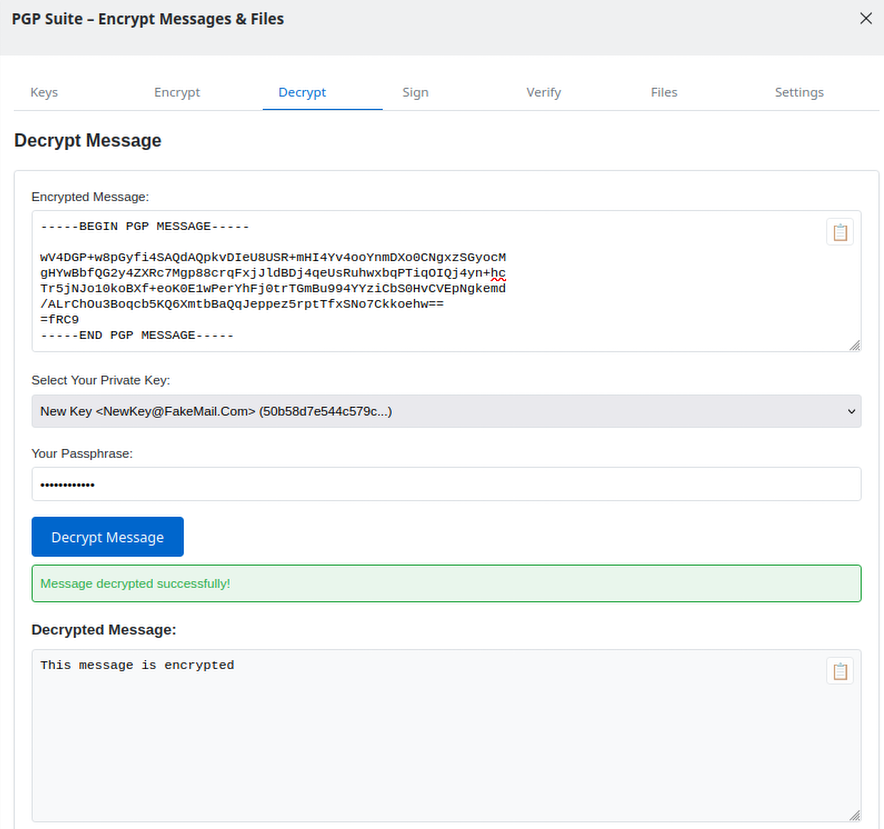
- Open the Decrypt tab.
- Paste the encrypted message.
- Select your private key.
- Enter your passphrase.
- Click Decrypt Message.
The original message will be displayed immediately.
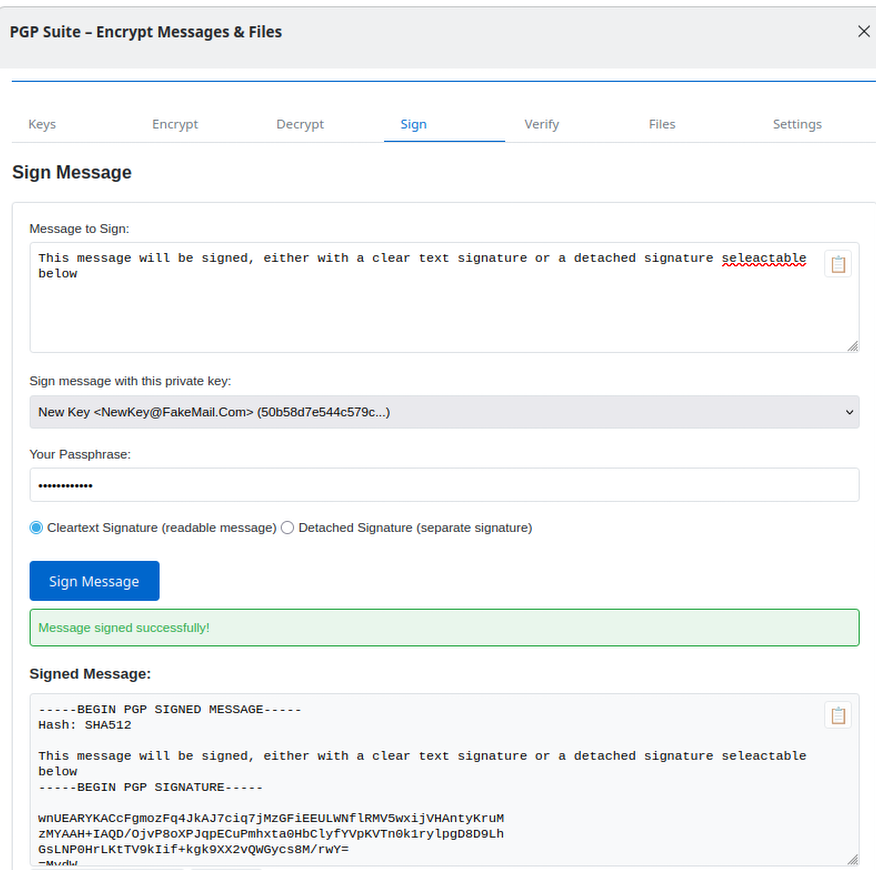
Signing a Message
Digital signatures allow recipients to verify that a message genuinely came from you.
- Open the Sign tab.
- Enter your message.
- Select your private key.
- Enter your passphrase.
- Click Sign Message.
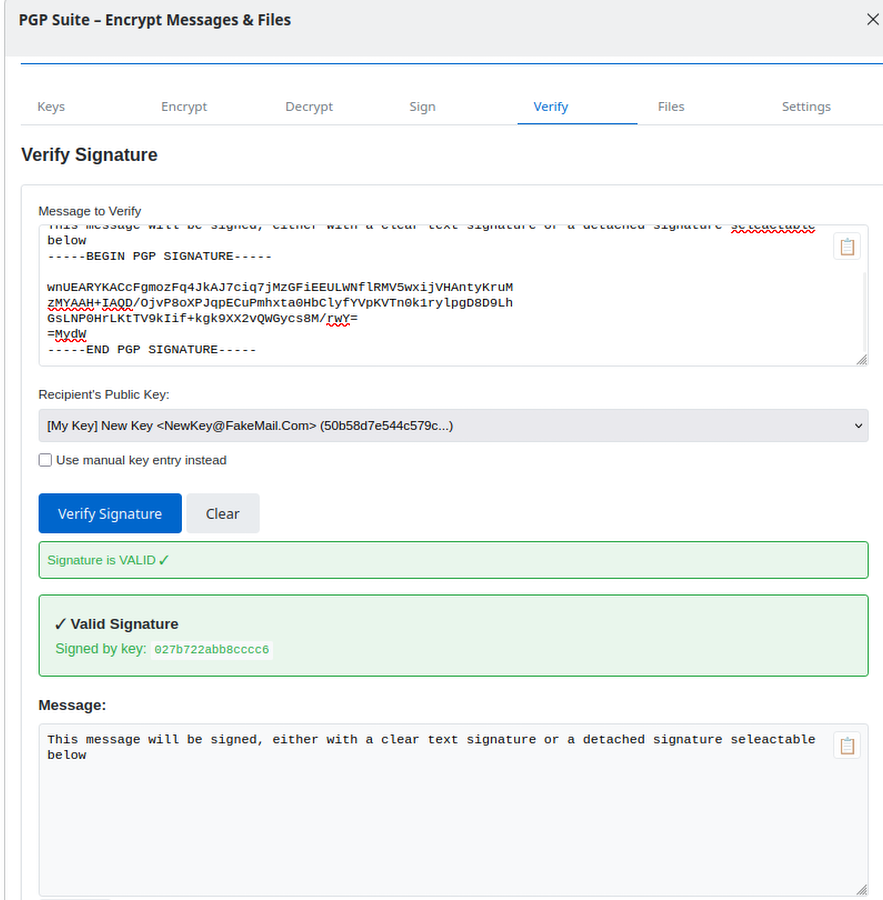
Verifying a Signature
- Open the Verify tab.
- Paste the signed message.
- Provide the sender's public key.
- Click Verify Signature.
PGPSuite will confirm whether the signature is valid.
Automatic PGP Detection
When browsing websites, PGPSuite can automatically detect:
- Encrypted PGP messages
- Signed messages
- Public keys
When detected, convenient action buttons appear directly on the page, allowing you to:
- Decrypt messages
- Verify signatures
- Import keys
without manually copying and pasting data.
Security Recommendations
For the best security:
Use a Strong Passphrase
Your private key is only as secure as its passphrase.
Back Up Your Keys
Store backups in a secure location.
If you lose your private key, you may permanently lose access to encrypted messages.
Verify Public Keys
Always verify key fingerprints when exchanging keys with new contacts.
Keep Your Browser Updated
Security updates are important for protecting your encrypted communications.
Frequently Asked Questions
Does PGPSuite store my passphrase?
No.
Passphrases are never stored and must be entered when needed.
Are my messages uploaded anywhere?
No.
All cryptographic operations happen locally inside your browser.
Does it work with existing PGP software?
Yes.
PGPSuite is compatible with standard OpenPGP keys and messages used by popular PGP applications.
Can I use multiple keys?
Yes.
You can create, import, and manage multiple key pairs.
Support
If you encounter issues or would like to report a bug, please visit the project's GitHub repository and create an issue.
Github Page for PGP Suite
Contributions
Visit the github page:
(Github Page for PGP Suite)[https://github.com/ernos/pgpsuite-firefox-tor-extension]
Donations
I do this 100% on my free time, I've been programming my whole life but been having a hard time getting into this line of work, so PLEASE, if you like this or anything else I do, feel free to donate any small or large amount to:
- Bitcoin: bc1qg7sqyhldmp3twahq0vxnlacuncyw24jf84z8n0
- Monero: 84Qp6KEnUXeh53CxsEDSnXVtaNHNvEeioDRd7PAaQqR92kYLeKWxoHh62b6CXzbpzXSERfvqHbHDMGCSnPCnatYr2FX7FC7
- Ethereum: 0x73660083E37F568acD27559F6e8C9c07d5011620
- Solana: 8pvjZrYeJ51K56uJj8vRhjnhr2hXcEZJkEueRh11n6u5
Secure communication should be simple.
PGPSuite provides modern OpenPGP functionality directly in Firefox and Tor Browser while keeping your keys and messages under your control.
Need an Android Developer or a full-stack website developer?
I specialize in Kotlin, Jetpack Compose, and Material Design 3. For websites, I use modern web technologies to create responsive and user-friendly experiences. Check out my portfolio or get in touch to discuss your project.

Comments (0)
Be the first to comment!