Agentic Workflows: Where AI Automation Actually Pays
A support inbox with 400 messages a day does not need an agent. It needs four rules and one classification call, and the difference between those two designs is roughly 2,000 lines of code plus a bill that never stops. Agentic workflows are automations where a model decides which step runs next, and that decision is the most expensive thing you can add to a process that already works.
I build these for a living, for companies and for people running a house, and the pattern that fails is always the same: the model was given a job that regex and a database constraint already did better. What follows is the decision framework, the wiring, the failure modes and the audit I run before anyone writes code.
Here is what you get out of this page:
- The workflow-versus-agent split, with a cost profile for each shape.
- A tool definition that makes duplicate actions impossible instead of unlikely.
- One business workflow and one home automation, both wired the same way.
- A failure table you can paste into a runbook, and the audit I run in a week.
Workflow or agent? Start with the cheaper one
The useful split comes from Anthropic's writing on agentic systems: a workflow orchestrates models and tools through predefined code paths, while an agent lets the model direct its own process and tool usage. That is not a naming argument, it is a budget argument. A workflow runs the same number of calls every time and you can price it. An agent runs as many calls as it decides to, including the ones it repeats after a mistake.
| Shape | Decides the next step | Calls per run | Debug cost |
|---|---|---|---|
| Script or cron | Your code | 0 model calls | Low |
| Workflow | Your code, model fills slots | 1–4, fixed | Low |
| Agent | The model | Unbounded | You read traces at 2 a.m. |
Default to the cheapest shape that survives the edge cases, because an agent is a workflow plus an unknown number of retries. I have shipped both, and every agent I still maintain has a workflow inside it doing the boring 80%: fetch, validate, normalise, then one model call on the residue. That is the honest description of nearly all successful agentic workflows in production — mostly script, with judgement confined to the part a script cannot describe.
The honest test is whether the steps are knowable in advance. If you can draw the flowchart on a whiteboard and it holds for a month, you want a workflow. If the input is prose, the path genuinely varies per case, and a wrong turn is cheap to detect, the model gets the wheel.
What changes when a model sits in the loop
Four properties break the assumptions an ordinary automation hands down to an agentic workflow, and each one has a matching guard.
Non-determinism. The same invoice can produce two different field extractions on two runs. Nothing in your pipeline may depend on the model being stable, so every model output gets validated against a schema and every arithmetic result gets recomputed in code.
At-least-once delivery. Webhooks retry. A provider that does not get a 2xx inside its timeout sends the same event again, and again, and it does not care that your handler already started a job. If your step creates something with a side effect, the retry creates it twice.
Billing per token, per call. A single agent turn resends the conversation. With a 4,000-token system prompt and three tool round-trips that each append roughly 800 tokens of result, the fourth call sends about 6,400 input tokens to produce a 200-token answer. Multiply that by daily volume before you compare the result to a person's hourly rate.
Latency you cannot hide. A four-call chain at two seconds a call is eight seconds before a human sees anything, which is fine for a nightly batch and unusable inside a checkout.
I learned the second one the hard way. A webhook handler created a draft invoice, called the model to fill three fields, then posted to the accounting API. The accounting call took eleven seconds because the vendor's API was slow that morning, the sender timed out, and the retry arrived while the first run was still in flight. Two draft invoices, same customer, different model-generated descriptions. The fix was not a smarter prompt: the handler deduplicated on the delivery ID and the create call required an idempotency key derived from that ID. If a retry can duplicate your side effect, the model is not the bug — the missing key is.
The four parts every agentic workflow needs
Every one of these I would defend in a review of any agentic workflow, and every one has been the cause of an incident when it was skipped.
- A trigger with an identity. A webhook delivery ID, a message ID, a file hash. This is what makes retries safe and what lets you say which run did what.
- Tools with narrow schemas. Not "update the CRM", but
create_invoice_draftwith required fields and no posting permission. - A policy layer outside the prompt. Thresholds, allow-lists, spend caps and the human approval queue live in code, because a prompt is a suggestion and a database constraint is not.
- A ledger. One append-only row per run: what triggered it, which tools ran with which arguments, what the model returned, what a human changed afterwards.
The tool schema is where most of the safety actually lives. MCP tool definitions carry a name, a description and a JSON Schema for the input, and that schema is the only thing standing between a hallucinated argument and your production data:
{
  "name": "create_invoice_draft",
  "description": "Create a DRAFT invoice. Does not post to accounting.",
  "inputSchema": {
    "type": "object",
    "required": ["customerId", "lines", "idempotencyKey"],
    "additionalProperties": false,
    "properties": {
      "customerId": { "type": "string" },
      "lines": { "type": "array", "items": { "type": "object" } },
      "idempotencyKey": { "type": "string", "pattern": "^[a-f0-9]{64}$" }
    }
  }
}
additionalProperties: false plus a required idempotencyKey turns two whole classes of incident into a validation error. The model cannot invent a field that reaches your database, and it cannot create the same draft twice.
How do I connect an agent to my business systems?
Use MCP unless you have a specific reason not to. It is the cheapest way to give an agentic workflow a typed tool without writing a bespoke client per vendor. The Model Context Protocol is an open standard for connecting AI applications to external systems, and the current spec revision is 2026-07-28. The data layer is JSON-RPC 2.0 over one of two transports: stdio for a local process on the same machine, and Streamable HTTP for a remote server, which is HTTP POST with optional server-sent events for streaming. Servers expose three primitives: tools for actions, resources for context data, and prompts for templates. Clients discover what is available rather than hard-coding it.
The transport choice is a security choice, not a performance one. A stdio server runs with the privileges of whatever launched it; a Streamable HTTP server can be scoped with OAuth, and that scope is the only boundary that survives a prompt injection. So: filesystem and shell work goes through a local stdio server with a narrow working directory, and anything touching a SaaS account goes through a remote server with OAuth, per-user consent and a token that expires.
Two details that matter when you pick a client. Protocol revision 2026-07-28 deprecates sampling, so do not build a workflow that depends on a server asking your client's model for a completion. And a server that proxies a third-party API is a confused deputy risk if it uses a static client ID with dynamic client registration: the MCP security guidance documents exactly how a stale consent cookie lets an attacker's redirect URI receive an authorization code. Ask your proxy vendor which of those four conditions they have removed.
A business example: invoice triage that survives contact with reality
This is the business agentic workflow I install most often, and it is deliberately boring in the middle.
| Stage | Owner | Why |
|---|---|---|
| Receive event | Code | Dedupe on delivery ID before anything else |
| Extract fields | Model | PDFs, scans and email bodies vary too much for regex |
| Validate totals | Code | Arithmetic is not a model job |
| Match vendor | Code, then model | Exact match first, model only on the residue |
| Route | Code | Confidence below threshold goes to a human queue |
| Post to accounting | Code, human-approved | Money movement stays with a person |
The model touches two stages out of six. It reads the messy input, and it disambiguates vendors that no exact match caught. Everything with a computable answer stays in code, because that is where you get free determinism and a test suite you can run on a Tuesday.
The approval queue is not a compromise, it is the feature. A reviewer sees the extracted fields beside the source PDF, edits inline, and approves. Every edit is a labelled example of what the extractor got wrong, which is how the threshold moves from 0.6 to 0.9 over two months. Ship it at a threshold you can defend on day one, then let the edit log earn the right to raise it.
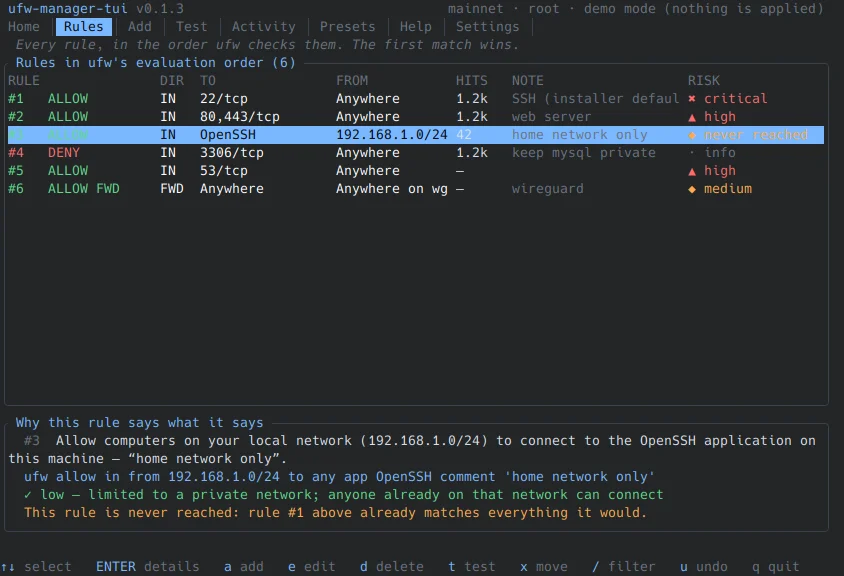
If you already run automations like the UFW manager walkthrough, the mental model is identical: the trigger and the guardrails are code, and the agent only fills the gap the rules could not describe.
Agentic workflows at home
Home automation has the same anatomy with lower stakes and no compliance officer. A Home Assistant automation is a trigger, an optional condition and an action, and it is an entity like any other: you can see its state and read attributes. The example in the docs is the whole idea — when someone arrives home and the sun has already set, turn the lights on.
A model belongs at the edge of that system, not at the centre. A house that depends on an inference call to turn on a light is a house that goes dark when the API has a bad afternoon. Keep every deterministic automation deterministic, and use the model only for the part a rule cannot express: summarising three camera events into one sentence, deciding whether an alert is worth a phone notification, or turning a rambling voice command into a structured request.
automation:
  - alias: "Driveway motion summary"
    triggers:
      - trigger: state
        entity_id: binary_sensor.driveway_motion
        to: "on"
    conditions:
      - condition: state
        entity_id: person.max
        state: "home"
    actions:
      - action: conversation.process
        data:
          text: "Summarise the last three driveway events in one sentence."
        response_variable: summary
The integration behind that action is the Conversation integration, which is also what Assist calls when you talk to the house; conversation.process takes your transcribed text and returns the agent's reply. If you edit YAML by hand, note that the current syntax uses plural triggers, conditions and actions, and that the UI owns automations.yaml, so a hand edit gets overwritten. Reload automations after any YAML change instead of restarting the whole instance.
Two rules keep the home bill at coffee money. Run the model only on events that passed a cheap filter, and run it on a local model when the data is a camera still, a door state or anything you would not send to a vendor. On my own box the deterministic automations handle routine traffic and the model sees maybe a dozen events a week, which is a rounding error next to the electricity.
What breaks, and what to log
Failures cluster, and they cluster in the same places whether the agentic workflow runs in a warehouse or in a house. These are the five I see repeatedly, with the guard that actually holds.
| Failure | What you notice | Guard |
|---|---|---|
| Duplicate side effect | Two invoices, two emails, two tickets | Idempotency key from the trigger identity |
| Silent fallback | Nothing arrives, nobody complains | Alert on the fallback path itself |
| Permission creep | The agent can do more in month six than month one | Allow-list per tool, reviewed quarterly |
| Injection via content | A document tells the agent what to do | Treat retrieved text as data, never instructions |
| Threshold drift | Quality drops without an error | Sample the ledger weekly, recompute accuracy |
Injection is the one people underestimate. If a tool returns a customer email, that email is attacker-controlled text arriving in the same context window as your instructions, and "ignore previous instructions" costs one line to type. The model can be talked into a bad decision; the tool schema is what stops that decision from travelling. Bound each tool to one verb, one resource type and one scope, and keep a human approval step in front of anything irreversible.
The ledger is what makes the rest debuggable: run ID, trigger payload hash, model and prompt version, every tool call with its arguments and result, token counts, latency, and the human edit if there was one. When something looks wrong three weeks later, that row is the difference between a 20-minute fix and a rewrite.
How I audit a business in one week
Before I quote anyone for a build, I run the same exercise, on their agentic workflows as they exist today, and it is free because it saves us both from a bad project.
- Log the work, not the wish list. For five working days, write down every recurring task, how long it takes and how many times it happened. People systematically overestimate the interesting tasks and forget the dull ones that eat the week.
- Score each candidate. Volume times minutes times error rate, against the cost of being wrong.
- Apply three filters. Is the input unstructured prose, scans or speech? Does a human check the output anyway? Is a wrong answer cheap to detect and reverse?
- Build two, kill the rest. Two shipped workflows beat eight prototypes, and the kill list is part of the deliverable.
A shortlist scored this way usually looks like this, and the payroll row is not a failure, it is the point:
| Candidate | Volume | Minutes each | Cost of a wrong answer | Verdict |
|---|---|---|---|---|
| Support email triage | 380/day | 2.5 | Low, recoverable | Build |
| Invoice data entry | 60/day | 6 | Medium, reversible | Build with approval |
| Payroll adjustments | 2/month | 45 | High, irreversible | Keep human |
| Weekly report | 1/week | 90 | None | Build |
That is the offer I make to anyone reading this: I will analyse your business for free and tell you which three agentic workflows are worth automating, including the ones you should leave alone. If you want that, the contact form is the fastest route, and the same audit works for a company with twelve employees or for a house with sixty devices. Bring the logs, not the pitch.
The limits I will tell you about before you pay anything
An agentic workflow is a subscription, not a purchase, and pretending otherwise is how these projects end up abandoned. Prompts need retuning when a model version changes, thresholds need reviewing when the business changes, and someone has to read the ledger. Budget a few hours a month per workflow or watch it quietly degrade.
It also cannot fix bad data. If your CRM has three spellings of the same customer, the model will pick one at random and sound confident doing it. Clean the identifiers, then automate.
And some things should stay human: final approval on money leaving the account, anything that terminates an employment or a contract, and any decision you would have to defend in front of a regulator. I will say no to those, in writing, before a contract exists.
Your first workflow, in order
- Pick one task with high volume, structured output and a cheap mistake.
- Write the deterministic skeleton first: trigger, dedupe, validate, log.
- Add one model call for the part you cannot express as rules.
- Wrap every side effect in a tool with a narrow schema and an idempotency key.
- Put a human in front of anything irreversible, and log their edits.
- Watch the ledger for two weeks before you raise any threshold.
Start with the process you already understand well enough to be bored by. The first agentic workflow should be the least interesting one in the building.
If you have automated something where the model turned out to be the wrong tool, I would genuinely like to hear what you replaced it with — and if you are still stuck at the whiteboard stage, the full archive is a decent place to see how these builds look in practice. That is the comment thread I learn the most from.
Need an Android Developer or a full-stack website developer?
I specialize in Kotlin, Jetpack Compose, and Material Design 3. For websites, I use modern web technologies to create responsive and user-friendly experiences. Check out my portfolio or get in touch to discuss your project.

Comments (0)
All comments are reviewed before they are published.
Be the first to comment!